
AI Blog Writer for WordPress: Auto-Publish Without a Plugin
Connect your WordPress site to Acta AI in three minutes using a standard Application Password. Auto-publish original, SEO-optimized blog posts with categories, tags, featured images, and full Yoast and RankMath metadata. No plugins, no bloat, no copy-paste.
On This Page
What Is an AI Blog Writer for WordPress?
An AI blog writer for WordPress is a tool that generates original blog posts using large language models and publishes them to your WordPress site automatically. The best tools handle the entire pipeline (topic research, writing, editing, featured image generation, SEO metadata, and publishing) without requiring you to copy and paste drafts from ChatGPT into the WordPress editor.
There are two kinds of AI blog writers for WordPress. The first is a WordPress plugin that installs into your site and generates content inside the WordPress admin. Examples include AI Engine, Rank Math Content AI, and Bertha AI. The second is an external platform that connects to your site via the WordPress REST API and publishes posts remotely. Examples include Acta AI, eesel AI, Autoblogging.ai, and WP AI Writer.
Acta AI is an external platform. That means no plugin to install, no performance impact on your site, and no security exposure from another plugin in your stack. Connection is done with a single WordPress Application Password, a scoped, revocable credential built into WordPress core since version 5.6.
Why WordPress Sites Need Automated Content
WordPress powers over 40% of the web, but most WordPress sites go months (or years) without new content. Manual blogging is time-consuming, and the gap between "I should post more" and actually posting is where most sites stall. A single well-researched, SEO-optimized blog post can take a human writer four to eight hours to produce. Multiply that across a weekly publishing cadence and it becomes a full-time job.
The WordPress plugin directory is full of "AI autoblogging" plugins, but most of them generate low-quality, templated, or scraped content that hurts your SEO instead of helping it. Google has been explicit: it does not penalize AI-generated content, but it does penalize unhelpful content. Low-effort autoblog plugins produce exactly the kind of unhelpful content Google targets.
Acta AI is different. It generates original, high-quality posts from your expertise and voice, then publishes them to WordPress with the full metadata your SEO setup expects, including categories, tags, featured images, excerpts, and Yoast/RankMath-compatible fields. Every post is scored for readability, SEO structure, originality, E-E-A-T, depth, and GEO citability before it publishes.
Acta AI vs Plugins vs Autoblogging Tools vs Manual Writing
Here is how Acta AI compares to the three alternatives: installing an AI WordPress plugin, using a traditional autoblogging tool, or writing manually.
| Dimension | Acta AI | AI Plugins | Autoblogging Tools | Manual Writing |
|---|---|---|---|---|
| Plugin installation required | No | Yes | Sometimes | No |
| Content quality | High (dual-model + review) | Variable | Low to mid | High (but slow) |
| Human review workflow | Built-in | Manual edit | Rare | N/A |
| Voice matching from samples | Yes | Rare | No | Yes |
| Yoast & RankMath SEO metadata | Yes | Varies | Varies | Yes |
| Featured images auto-generated | DALL-E 3 + Unsplash | Sometimes | Sometimes | Manual |
| GEO optimization (AI search) | Built-in | No | No | Rare |
| Setup time | 3 minutes | 10-30 minutes | 10-30 minutes | N/A |
| Cost per post (all-in) | ~$1-3 | $0.50-5 + plugin fee | $0.50-3 | $50-300 |
| Affects site speed | No | Yes (bloat) | Sometimes | No |
How Acta AI Works for WordPress
Setting up Acta AI on a WordPress site takes about three minutes. Here is the full flow.
Connect via Application Password
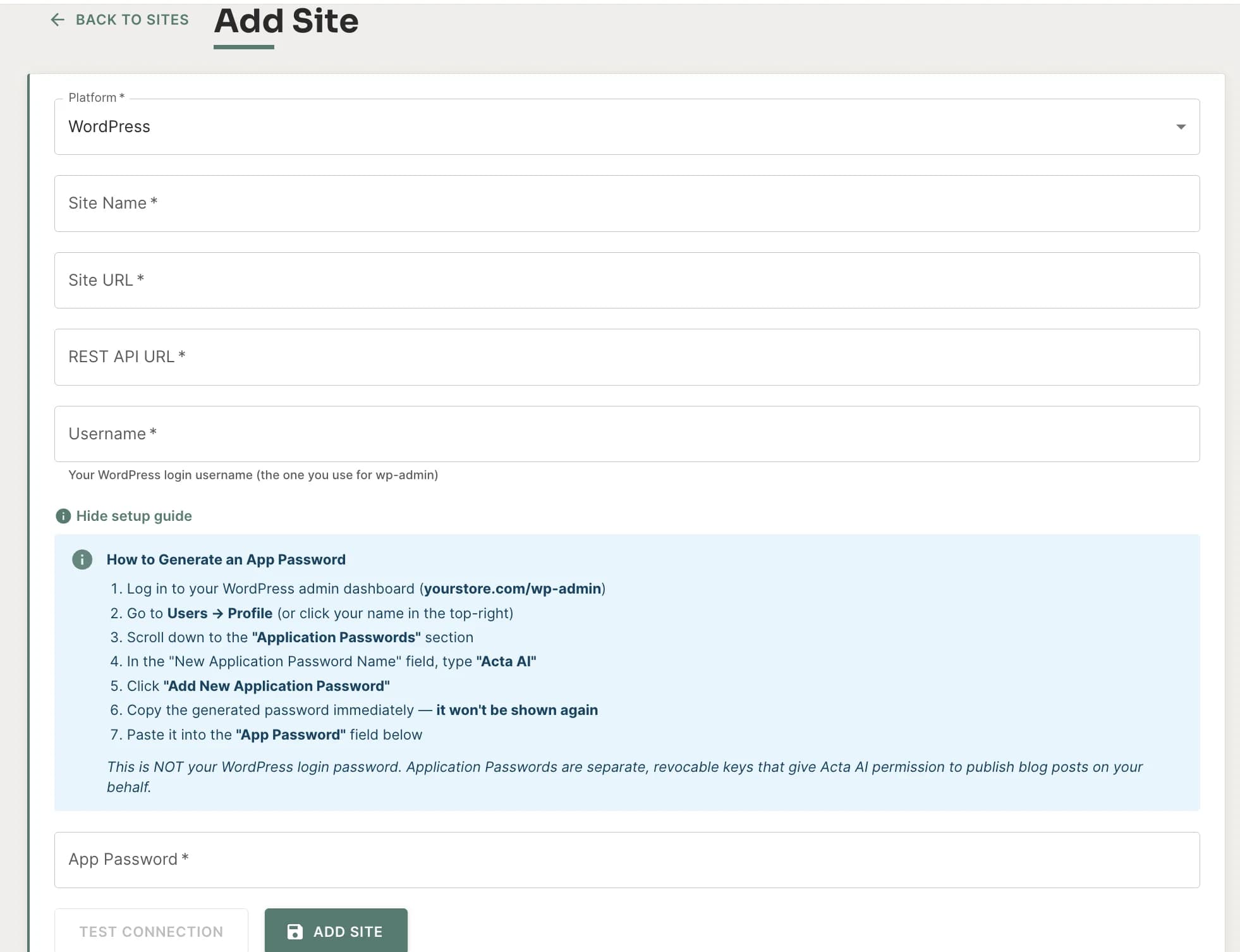
In WordPress, go to Users > Profile and generate a new Application Password named "Acta AI". Paste your site URL and the password into Acta. No plugins, no code, no FTP. Acta auto-detects your REST API endpoint.
Configure Topics, Voice, and Schedule
Set your industry, tone, topic list, publishing frequency, and default categories and tags. Paste a writing sample to activate voice matching. Complete the experience interview for E-E-A-T signals.
Acta Publishes With Full Metadata
Every post is published with categories, tags, featured images, SEO excerpt, Yoast/RankMath-compatible metadata, and JSON-LD schema. Fully automated or queued for your review. Your choice.
How to Set Up a WordPress Application Password
Application Passwords are the official WordPress method for granting REST API access to external tools. They are built into WordPress core (since WP 5.6), scoped to a single application, and fully revocable. Here is how to create one for Acta AI.
- Log in to your WordPress admin and go to Users > Profile.
- Scroll down to the Application Passwords section.
- In the "New Application Password Name" field, enter Acta AI and click Add New Application Password.
- WordPress displays a 24-character password once. Copy it immediately, because you will not be able to see it again.
- In Acta AI, click Add Site, paste your WordPress URL, your WordPress username, and the Application Password. Acta auto-detects the REST API endpoint.
- Click Test Connection. If it passes, you are ready to create your first schedule.
Tip: If the Application Passwords section is missing, your WordPress site may be behind a security plugin that disables the REST API. Whitelist the /wp-json/ endpoint or create the Application Password from a server-side tool. If you are on WordPress.com (hosted), Application Passwords are available on paid plans only.
What Acta Publishes to Your WordPress Site
Every post Acta publishes to WordPress comes fully structured. You never have to add fields after the fact.
| WordPress Field | What Acta Sets |
|---|---|
| Post title | Generated via weighted title rotation (5 variants scored by CTR potential) |
| Post body (HTML) | Markdown converted to WordPress-native HTML with heading hierarchy |
| Slug | Auto-generated from title (SEO-friendly, kebab-case) |
| Excerpt | Dedicated AI pass, not truncated from the body |
| Featured image | DALL-E 3 or Unsplash, uploaded to your Media Library |
| Categories | From schedule defaults or AI-suggested |
| Tags | From schedule defaults or AI-suggested |
| Yoast SEO title | Distinct from post title, character-optimized |
| Yoast meta description | Under 160 characters, keyword-aligned |
| RankMath metadata | Mirror of Yoast fields for compatibility |
| FAQ schema (JSON-LD) | FAQPage structured data embedded in post body |
| Post status | Publish, pending review, or draft (schedule-controlled) |
| Author | Mapped to your Application Password user account |
WordPress Compatibility
Because Acta AI publishes via the WordPress REST API at the post level, it is compatible with every modern WordPress setup: any theme, any SEO plugin, any page builder, and any hosting provider.
SEO Plugin Compatibility
Yoast SEO
RankMath
All in One SEO (AIOSEO)
SEOPress
Theme & Page Builder Compatibility
Also Supported
WooCommerce: Blog posts publish to the standard WordPress post type and reinforce internal linking to product and category pages, without interfering with your storefront.
WordPress Multisite: Connect each sub-site independently with its own Application Password. Each site gets its own voice, topics, and schedule.
Managed WordPress Hosting: Works on WP Engine, Kinsta, Flywheel, SiteGround, Bluehost, Cloudways, and every other host that does not block REST API access. If your host blocks /wp-json/, you will need to whitelist it.
Security: Application Passwords Explained
Security matters. When you connect a tool to your WordPress site, you are granting it the ability to create, edit, and publish content. Acta AI uses WordPress Application Passwords, the officially recommended mechanism for REST API access, for three reasons.
Scoped Access
An Application Password grants REST API access only. It does not allow the tool to log in to your WordPress admin, change user accounts, or install plugins.
Individually Revocable
If you stop using Acta AI (or suspect the credential has been compromised), you can revoke the Application Password from your WordPress profile with one click, without changing your main login password.
Built Into WordPress Core
Application Passwords have been part of WordPress core since version 5.6 (December 2020). They are not a third-party plugin, and they do not require any additional security extensions to work.
What Makes Acta AI Different
Most AI blog writers for WordPress ship a draft and call it done. Acta AI runs a 10-step content pipeline that goes deeper at every stage.
Dual-Model Architecture
Prose is written by a frontier model tuned for voice, nuance, and longer-form coherence. Structured extraction, including titles, meta descriptions, FAQ schema, and data viz, runs on a separate model optimized for that job. Competitors use a single model. We use the best tool for each job.
Acta Score (6 Dimensions)
Every post is scored on Readability, SEO Structure, Originality, E-E-A-T, Depth, and GEO Citability before it publishes. If it falls short, you see exactly which dimension needs work.
GEO Optimization Built In
Every post is structured for Google AI Overviews, ChatGPT web search, and Perplexity. Entity relationships, quotable definitions, inline citations, and PAA-style headings are baked in by default.
Pre-Publish SERP Analysis
Before writing, Acta analyzes the top-ranking Google pages for your topic, extracts common subtopics, LSI keywords, and coverage gaps, then bakes them into the outline.
Content Calendar With Skip Runs
See every upcoming post on a monthly calendar. Skip individual runs without breaking the schedule. Pause entire schedules when you need a break, then resume with one click.
Review Workflow + Revise With AI
Queue posts for your approval with one click. Not quite right? Give natural-language feedback and Acta rewrites in-place. Most autoblogging tools ship and forget.
How This Differs From ChatGPT Copy-Paste
ChatGPT and Claude are excellent drafting tools, but they stop at the draft. To publish a post to WordPress from a ChatGPT draft, you still have to:
- Pick a topic that is not duplicate or cannibalizing existing content
- Check what the top-ranking competitors cover and find gaps
- Research current statistics and sources
- Draft, edit, and revise for voice and tone
- Source or generate a featured image
- Upload the image to the WordPress Media Library
- Write the SEO title tag, meta description, and focus keyphrase
- Set categories, tags, excerpt, and slug
- Add FAQ schema if you want rich results
- Paste everything into the WordPress editor and publish
That is 10 manual steps per post, every time. At two posts per week, that is 20 hours per month just on operational work, before you write a single word.
Acta AI does all of it. Topic selection, SERP competitor analysis, web research, outline, draft, review, charts, FAQ schema, metadata, featured image generation, and WordPress publishing all run on a schedule, in your voice, with your brand knowledge. You set it up once and it runs.
Who This Is For
Solo Bloggers & Creators
Publish consistently without burning out. Acta handles research, writing, images, and SEO. You focus on what only you can do: strategy and promotion.
Content Agencies
Manage client sites from one dashboard. Each client gets their own voice, topics, schedule, and review workflow. Bill for outcomes, not drafting time.
Ecommerce & WooCommerce
Publish category-page-supporting blog content at scale. Every post reinforces internal linking and product discovery without cannibalizing your product pages.
Consultants & Service Businesses
Build topical authority in your niche. Voice matching keeps every post sounding like you, so prospects reading your blog feel like they already know you.
Frequently Asked Questions
Connect your WordPress site to an external AI content platform like Acta AI using a WordPress Application Password, configure topics and publishing frequency, and the platform will generate and publish posts to your site via the WordPress REST API on the schedule you set. No plugins are required because the REST API is built into WordPress core.
No. Google has publicly stated that it does not penalize content for being AI-generated. Google ranks content based on helpfulness, E-E-A-T signals, and quality, regardless of authorship. Low-quality AI content hurts SEO, but so does low-quality human content. Acta AI is specifically engineered to produce high-E-E-A-T content: author experience injection, contrastive voice examples, a 186-phrase banned list, and a 6-dimension Acta Score check on every post before publish.
A WordPress Application Password is a scoped, revocable credential that lets external applications access your site via the REST API without exposing your main login. They are built into WordPress core (since WP 5.6) and are the officially recommended way to grant API access. They are safer than giving a tool your real password because they can be revoked individually, they do not grant admin UI access, and they are tied to a single application.
No. Acta AI connects to your site using the built-in WordPress REST API and a WordPress Application Password. There is no Acta plugin to install, no code to modify, and no impact on your site speed. This is intentional. Plugin bloat slows WordPress sites, and every plugin is a potential security risk.
Yes. Acta AI generates SEO title tags, meta descriptions, and focus keyphrases for every post and writes them in a format compatible with Yoast SEO, RankMath, and All in One SEO (AIOSEO). Your existing SEO plugin setup keeps working exactly as configured. Acta does not replace your SEO plugin; it feeds it clean metadata on every publish.
Yes. Acta AI publishes via the WordPress REST API, which sets content at the post level. That means the posts render correctly in any theme, including Gutenberg block themes, Full Site Editing themes, classic themes, Elementor, Divi, Astra, GeneratePress, Kadence, and Bricks. You do not need to change themes or use a specific page builder.
Yes. Acta AI is an excellent fit for WooCommerce stores that want to publish category-page-supporting blog content at scale. Blog posts are published to your standard WordPress post type (not products), so they reinforce internal linking without interfering with your storefront.
ChatGPT produces a draft, but you still have to edit it, add featured images, set categories and tags, write the meta description, add FAQ schema, and paste it into WordPress every time. Acta AI handles the entire pipeline (topic selection, SERP competitor analysis, web research, outline, draft, review, charts, FAQ schema, metadata, featured image generation, and WordPress publishing) on a schedule, in your voice, with your brand knowledge.
Yes. Every schedule supports Review First mode, where posts queue up for your approval. You can read them, revise with natural-language AI feedback, approve, or reject. Auto-Publish mode is available if you prefer fully hands-off operation. You can switch between modes at any time.
Yes. Connect each sub-site separately using that sub-site's URL and an Application Password from a user with publishing permissions on that site. Each sub-site becomes an independent site in your Acta dashboard with its own voice, topics, schedule, and categories.
Acta AI starts at $29/month on the Scriptor plan and includes content generation, publishing, and featured images. There is a 14-day free trial with no credit card required. Token costs are covered by your subscription, so there is no separate AI provider bill. See the pricing page for full plan details.
Acta AI catches REST API errors, logs them to your error dashboard, and classifies them (connection error, auth error, rate limit, etc.). Scheduled runs that fail do not silently disappear. You see them in your "Needs Attention" dashboard with guidance on how to fix them. Once the site is back online, you can retry the run with one click.
Start Auto-Publishing to Your WordPress Site
14-day free trial. No credit card required. No plugin to install.